Synametrics Technologies
Revolving around the core of technology
Uninstalling SynaMan Drive
Although SynaMan Drive includes an uninstaller, it may occasionally leave traces on your machine. In addition to running in the background, SynaMan Drive integrates with Windows File Explorer. Since Windows File Explorer opens some files, the uninstaller cannot remove them unless those files are closed. This page discusses how to cleanly remove SynaMan Drive from any computer.
Steps To Uninstall
- Step 1 - Terminate SynaMan Drive. This is done by right-clicking the SynaMan Drive icon in your Windows System Tray and clicking "Exit".
- Step 2 - Restart Windows File Explorer. Open Task Manager, locate Explorer, right-click it, and select Restart, as shown below.
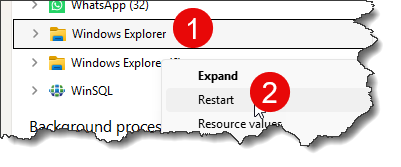 Note that closing every instance of Explorer is not enough.
- Step 3 - Run the uninstaller. Go to Add Remove Programs and remove SynaMan Drive.
