Synametrics Technologies
Revolving around the core of technology
Increasing Maximum Memory on Windows
Both SynaMan and Syncrify are capped on the maximum amount of memory the process will consume. In certain cases, you may have to increase or decrease this amount. This page outlines the steps to change this value. These instructions are only applicable if you're using the Windows operating system.
Note: Do not increase the maximum value beyond 50% of the available RAM on your machine. For example, if the available RAM on your machine is 8 GB, the maximum value configured for Syncrify or SynaMan should not exceed 4GB.
Tip: We do not recommend increasing beyond 4GB of RAM for Syncrify and SynaMan.
Steps
- Open Windows Registry - regedit.exe
- Navigate to HKEY_LOCAL_MACHINE\SOFTWARE\WOW6432Node\Apache Software Foundation\Procrun 2.0\SynaMan\Parameters\Java - for SynaMan,
- Or HKEY_LOCAL_MACHINE\SOFTWARE\WOW6432Node\Apache Software Foundation\Procrun 2.0\SynaMan\Parameters\Java for Syncrify
- Double-click the Options node on the right-hand pane
- Modify the value for the -Xmx line. For example, from -Xmx512m to -Xmx2028m. Refer to the screenshot (before and after below)
- Restart Syncrify/SynaMan
Before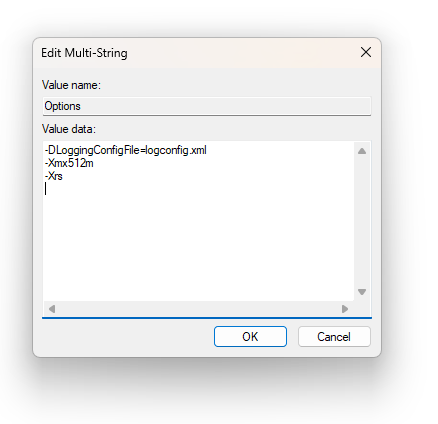 |
After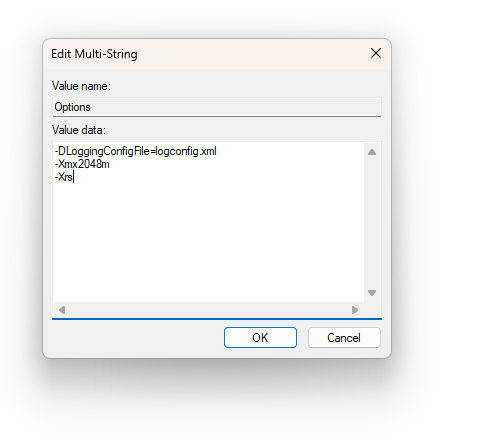 |
