Synametrics Technologies
Revolving around the core of technology
Protecting Privacy in AI-Powered Database Management
Modern organizations run on data. Customer records, financial transactions, internal communications, product information, everything sits in a database somewhere. As databases keep getting larger and more complex, many teams opt for database management tools, especially now with AI to help them search, clean, and understand that data. AI-powered solutions that combine data from multiple systems into a single interface. For instance, an AI accounting tool might pull information from databases and banking systems and generate actionable insights.
But the moment AI enters the conversation, another topic comes into play: privacy. Like, how do you take advantage of AI in your database workflows without exposing sensitive information? And how do you make sure the tools you use respect the boundaries set by privacy laws and internal security policies?
Why AI Is Showing Up in Database Management
AI isn't just for data scientists anymore. It has quietly worked its way into database management work, helping with basic activities like:
- Drafting or fixing SQL queries
- Suggesting joins, filters, or a better way to write queries
- Making it easier for teams to explore data without needing deep SQL knowledge
- Spotting patterns or inconsistencies that are hard to catch manually.
These "AI helpers" simply make the workflow smoother, faster, and accessible for both technical and non-technical users.
Where Privacy Concerns Start
Databases often contain private or regulated information:
- Personal Identifiable Information (PII)
- Medical and financial information
- Internal and external corporate documents
- Employee information
- Customer records, logs, and others
If an AI tool interacts with this data, you must understand what the tool sees, where the processing happens, and who has access to the result.
This becomes even more important when companies use:
- Third-party cloud-based AI
- Services that send data outside the company
- Tools that log prompts or store queries
Privacy issues arise when data leaves the secure environment of the database.
The Right to Privacy in a Database + AI World
Laws like GDPR, CCPA, HIPAA, and several financial regulations put strong guardrails around personal data. Even without formal laws, customers expect companies to be responsible with their information.
So when AI tools get involved, organizations must make sure:
- Sensitive data does NOT get shared with external AI systems
- No query logs containing private data are stored externally. Access is audited and traceable
- The user keeps control over what the AI sees
- Data stays inside their secure network
Where WinSQL Fits Into This Conversation
Unlike many AI database management tools that rely on cloud processing, WinSQL approaches this differently by giving users control over what information is shared with the AI engine, balancing usefulness with privacy.
When using AI assistance in WinSQL, sending the design of your database can help the engine return more practical answers tailored to your needs. However, sharing database structure can be sensitive, especially for organizations that cannot risk exposing their schema to a third party.
To address this, WinSQL offers a Schema Privacy dropdown that lets you choose exactly what is shared:
- Exclude Schema (default): No CREATE TABLE statements are sent. AI responses won't be tailored to your database design.
- Include On-Demand Schema: Only the CREATE TABLE statements for tables exclusively mentioned in your prompt are sent. Misspellings or unlisted tables won't be included.
- Include Full Schema: Every table in the catalog is sent. This gives the most accurate answers but reduces privacy.
You can further limit what is sent by filtering the catalog, selecting specific schemas or table name patterns, so only relevant tables are shared.
In all cases, WinSQL only sends:
- CREATE TABLE statements (if schema sharing is enabled)
- Name and version of the backend database
- Type of driver (ODBC or JDBC)
Examples of AI in WinSQL
WinSQL's AI acts as a smart assistant to make database interactions faster and more intuitive:
AI in WinSQL acts as a knowledgeable assistant for your database, making interaction faster, more accessible, and more powerful for both technical and non-technical users:
- Natural Language to SQL:Generate complex SQL queries from plain English prompts, such as "Show me the last invoice of a customer and total sales for the last quarter."
- Automated Query Optimization: AI can analyze queries and suggest improvements, like optimizing joins or identifying missing indexes, helping queries run faster and reducing server load.
- Error and Syntax Correction: Acts as a smart linter to detect and correct syntax errors, typos, and logical issues, saving debugging time.
- Enhanced Learning and Explanations: AI can explain complex queries or stored procedures in plain English, helping users understand the logic behind the code.
Step-by-Step Example:
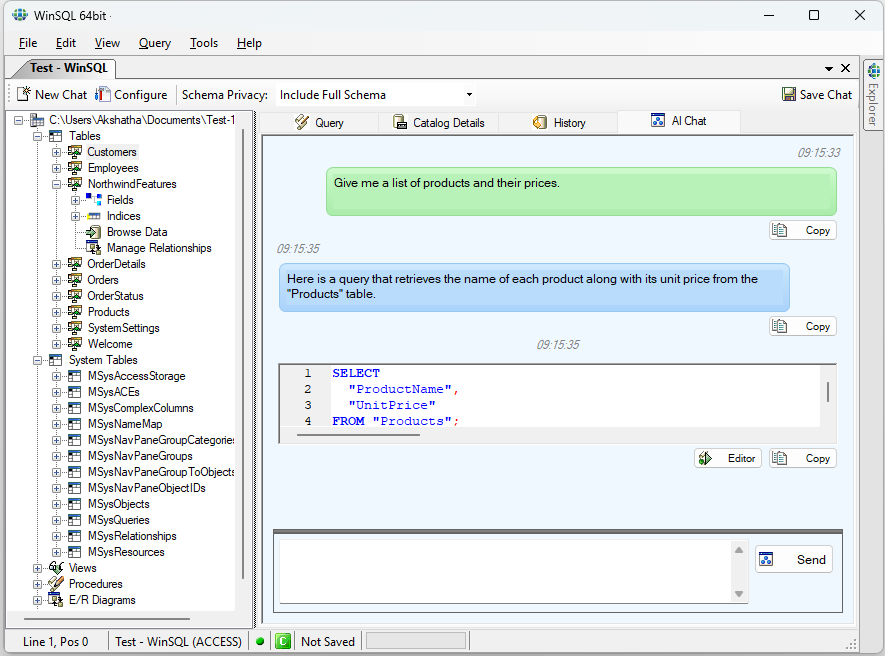
Step 1: Ask your question in Plain English with WinSQL AI chat.
Just type naturally. In this example, "Give me a list of products and their unit price, and click Send. WinSQL AI turns your question into an SQL query.
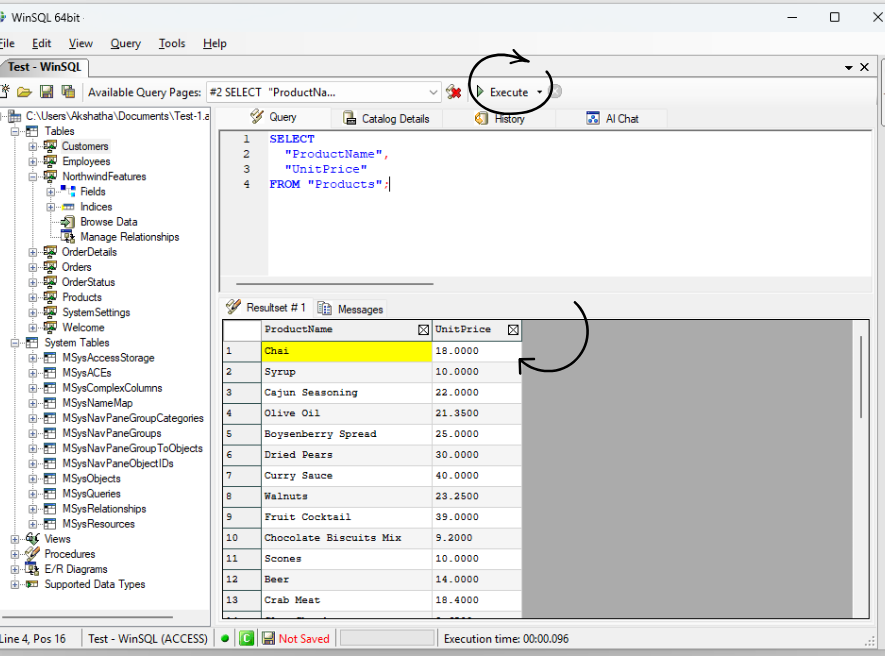
Step 2: Run the SQL Query
Next, execute the query to get the full, accurate dataset directly from the database.
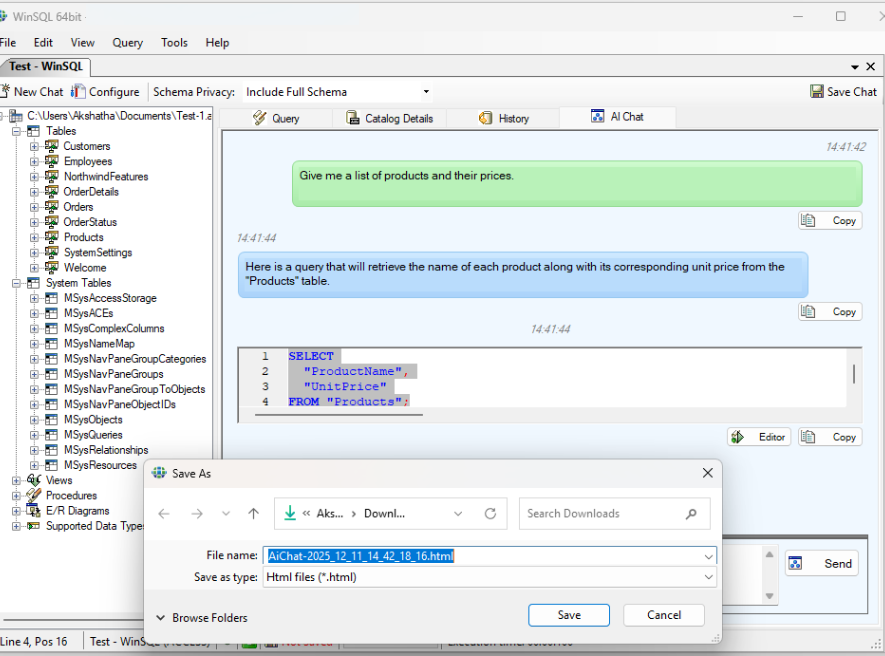
Step 3: Save the Results
Once the results are generated, save the output so you can use it later.
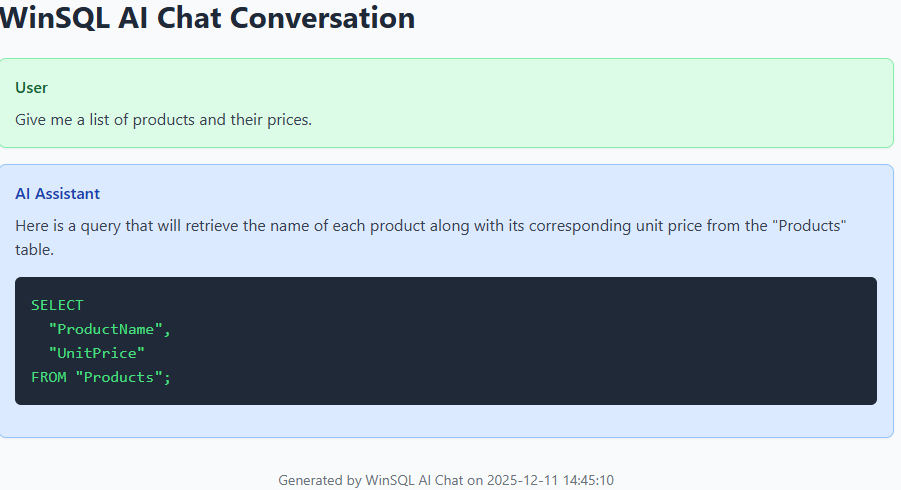
Step 4:Final Saved Data
Export or save your final summary for reports or further analysis.
WinSQL supports multiple AI providers, giving users flexibility:
- Ollama - Free
- Google Gemini
- ChatGPT Azure
- OpenAI - Paid
- Meta LLaMA - Free (requires signup)
This allows organizations to choose a provider that meets both their performance and privacy requirements.
Conclusion
Using smart tools as partners instead of replacements is changing how we manage databases. Database admins still spend a lot of time fixing issues and monitoring systems, but with the WinSQL AI feature, they can make fewer mistakes and work faster while keeping sensitive information safe. These tools pull in relevant, up-to-date information to help users get better results. Combining these technologies with database solutions like WinSQL makes them really valuable.
| Created on: | Dec 9, 2025 |
| Last updated on: | Dec 13, 2025 |
