Synametrics Technologies
Revolving around the core of technology
Document information
| Document ID: | 1863 |
|---|---|
| Subject: | Specifying backup direction in Syncrify |
| Creation date: | 9/28/11 3:57 PM |
| Last modified on: | 10/30/18 12:46 PM |
Backup Direction
Traditionally, files are copied from the machine where the Syncrify client runs to the Syncrify server. New versions of Syncrify allows copying files in both directions.You can select how files are copied by using the Direction option in Syncrify client
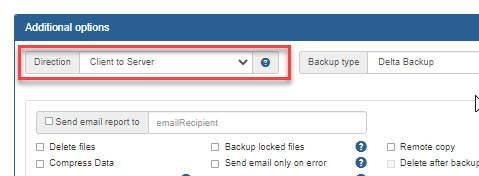
The following table describes what each option means.
| Direction | Description |
|---|---|
| Client to Server | This is the default behaviour. When a backup is run, newer files on the client machine are backed up to the server
machine. No files are copied from the server to the client.
If Delete Files is checked, files deleted on the client will be deleted from the server as well, unless Delete Retention has a value greater than 0. |
| Two-way sync | Newer files are copied in both directions. This means if a new version of a file exist on the server, it will get copied (or restored) to the client. Similarly, a new file on the client will get copied (backed up) to the server. Click here for more information.
The Delete Retention option has no affect when Two-way sync is enabled. This option is NOT available in the Personal edition of Syncrify. |
| Server to Client | Files on the server are copied to the client if they are different. This is similar to running a restore operation with one difference: If Delete Files is checked, local files on the client will be deleted if they do not exist on the server.
This option is NOT available in the Personal edition of Syncrify. |
Add a comment to this document
Do you have a helpful tip related to this document that you'd like to share with other users?
Important: This area is reserved for useful tips. Therefore, do not post any questions here. Instead, use our public forums to post questions.
