Synametrics Technologies
Revolving around the core of technology
Document information
| Document ID: | 1198 |
|---|---|
| Subject: | Manually downloading a newer version and applying the patch |
| Creation date: | 1/11/10 4:53 PM |
| Last modified on: | 2/10/12 3:15 PM |
Manually Updating SynaMan
Follow the steps below to manually update your copy of SynaMan.Prerequisite
You will needSynaManManualUpdate.zip file before
proceeding. Contact our support department to obtain this file.
Patching instructions if you're using v4.9 or above.
- Log in as admin to the web interface.
- Click Check for updates under Quick Links on the right-hand side.
- You will see the following message.
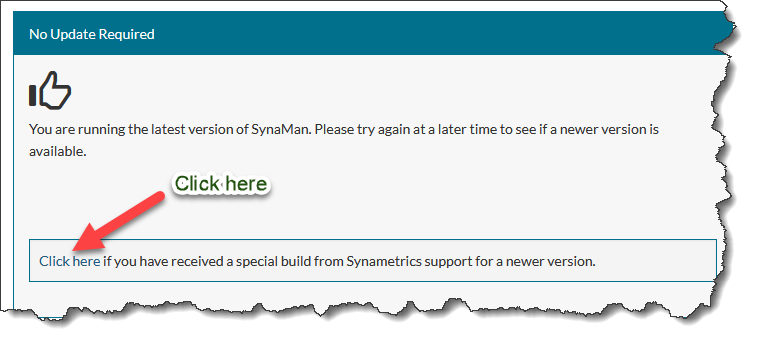
- Click the Browse button on the following screen, select
SynaManManualUpdate.zipthat was sent to you by our support department and finally, click Upload. - Restart SynaMan once the file has been uploaded.
Patching instructions if you're using an older version.
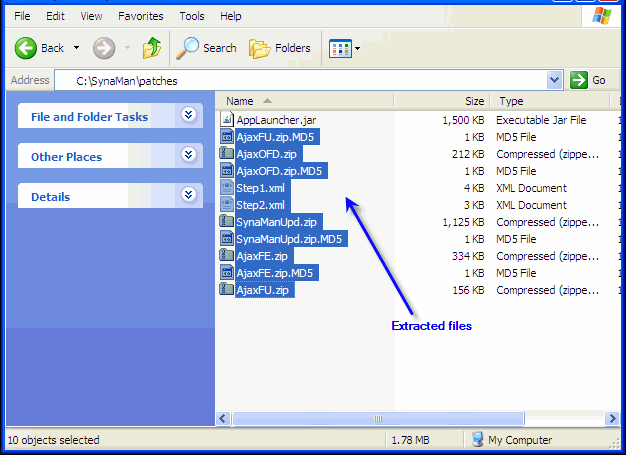
- Extract the contents of
SynaManManualUpdate.zipfile to $INSTALLDIR\patches folder. $INSTALLDIR is the location where SynaMan is installed. - The following image display these files
- Then, log in to SynaMan's web interface as admin
- Click the link Restart SynaMan on the left hand side
- Watch the $INSTALLDIR/patches folder as SynaMan is restarting. Every file except AppLauncher.jar should disappear.
Add a comment to this document
Do you have a helpful tip related to this document that you'd like to share with other users?
Important: This area is reserved for useful tips. Therefore, do not post any questions here. Instead, use our public forums to post questions.
