Synametrics Technologies
Revolving around the core of technology
Document information
| Document ID: | 801 |
|---|---|
| Subject: | Serial number does not work |
| Creation date: | 7/29/09 4:06 PM |
| Last modified on: | 12/11/18 4:43 PM |
Details
The most common reason for a serial number to not work is a version
mismatch. For example, the serial number issued for version 6.5 will not
work with version 6.0 or 7.0.
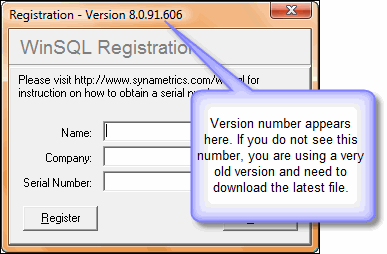 The version of WinSQL is displayed on the registration window. Aside from the version, the following are also important:
- Company Name - This is case sensitive
- Serial Number - This must be 20 characters long
Additionally, click Help/About on the main menu to check what version of WinSQL you are using. You can also check the version using Windows Explorer. This is done by clicking the right mouse button on WinSQL.exe file in Explorer and selecting the Properties menu item from the pop-up menu.
IMPORTANT
Often users obtain WinSQL from third-party websites, which may result in downloading an older version. If you have downloaded WinSQL from some other website, make sure it is the latest version. The latest version is 17.0.276.816Further Option
If you are absolutely sure you have pasted in the correct values for company name, serial number, the version is correct as well and still get an error, send us a screenshot of the registration Window displaying the values you have entered and send it to our support department for further investigation.User comments
Posted by Sarmistha Pathak on 10/28/16 8:04 AM
Add a comment to this document
Do you have a helpful tip related to this document that you'd like to share with other users?
