Synametrics Technologies
Revolving around the core of technology
Document information
| Document ID: | 810 |
|---|---|
| Subject: | Fetching database catalog - takes very long |
| Creation date: | 7/29/09 4:39 PM |
| Last modified on: | 12/12/18 10:14 AM |
Details
After establishing connection to the database, WinSQL tries to fetch the database catalog. On larger databases, with thousands of tables, this may take a very long time. Therefore, it is recommended that you turn this feature off. Following steps show you how to do that.
|
|
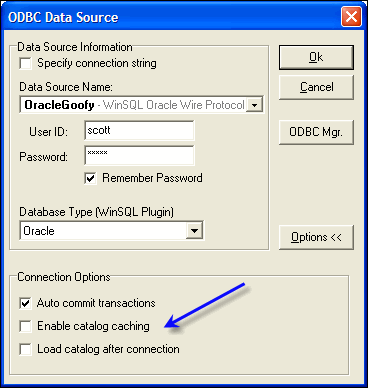
Disadvantage of disabling catalog
Features that depend on the catalog won't work until the catalog is fetched. These features are:- Intelli-Tips
- Drill down results
To decrease the amount of data returned in the catalog window, try specifying a particular schema/user in the catalog window.
User comments
Posted by MR on 2/14/18 12:34 PM
Please stop automatically fetching the catalog. It is useless for many of us. Give us the option to completely turn it off
Posted by Giridhar Alamuri on 3/23/17 11:08 AM
I have the lite version of the software (version number 10.0.193.733) and there are no options on a generic ODBC driver for caching the catalog and it does not make a difference whether the "Fetch catalog asynchronously" is checked or not. It still downloads the catalog and the connections is slow.
Posted by Satya on 8/23/18 4:50 PM
Though I uncheck "load catalog after connection", winsql is trying fetch catalog. I have latest version as of today.
Posted by Satya on 8/23/18 4:52 PM
Though I uncheck "load catalog after connection", winsql is trying fetch catalog which is never expected. This is hanging winsql to use. I have latest version as of today. Does anyone know how to get this fixed ?
Add a comment to this document
Do you have a helpful tip related to this document that you'd like to share with other users?
Important: This area is reserved for useful tips. Therefore, do not post any questions here. Instead, use our public forums to post questions.
