Introduction
SyncriTab gives your team a secure, browser-based workspace for querying and managing your organization's databases.
What is SyncriTab?
SyncriTab is a database query tool that runs in a web browser. You install it once on a server in your network. Your team then signs in from a browser to connect to databases, write and run SQL, browse database objects, move data, and schedule recurring jobs. Nothing needs to be installed on anyone's computer.
SyncriTab connects to databases through JDBC, so it works with most relational databases, including Microsoft SQL Server, Oracle, MySQL, and PostgreSQL. Because connections, users, and permissions are managed in one place, you decide who can reach which database without distributing drivers or connection details to each person.
How SyncriTab works
Browsers never connect to your databases directly. Every query goes through the SyncriTab server.
When you run a query, the SyncriTab server sends it to the database and saves the results on the server as they arrive. Your browser loads the rows as you scroll, so even very large results don't slow down or crash your browser.
Managers set up each database connection once as a data source. Developers pick a data source from a list and sign in with their own database user name and password. They never need to know a connection string or install a driver.
Key features
Write and run SQL
- A SQL editor with syntax highlighting and IntelliSense suggestions for tables and columns.
- Multiple query pages per connection, each with its own script and results.
- Results grids that handle large result sets and queries that return several result sets.
- Saved scripts, and workbooks that save all your query pages together.
- Query history, so you can find and re-run earlier queries.
- Saved sessions that restore your query pages and results when you return.
Explore your databases
- A catalog browser for tables, views, stored procedures, and other objects.
- Details for each object, including its data, columns, source code, and comments.
- Entity-relationship (ER) diagrams that show how tables are related.
- Database Search, which finds tables, views, columns, procedures, and triggers whose names or definitions contain a search term.
Move and compare data
- Export query results to CSV, Microsoft Excel, or HTML files, to INSERT statements, or directly to a table in another database.
- Import data from text files.
- Schema Diff, which compares the structure of two databases.
- Reverse Engineering, which generates DDL scripts from an existing database.
Automate
- A task scheduler that runs SQL scripts and data exports automatically, on a schedule you choose.
Secure and manage
- Separate roles for administrators, managers, and developers.
- Access to each data source granted user by user.
- Two-factor authentication, which administrators can make mandatory.
- HTTPS, with your own certificate or a free certificate from Let's Encrypt.
- Automatic blocking of IP addresses after repeated failed sign-in attempts.
- Idle sessions that sign out automatically and close their database connections.
- Optional encryption of sensitive files saved on the server.
- Reports on sign-ins, query activity, and scheduled tasks.
Supported databases
SyncriTab works with any database that has a JDBC driver. Drivers for many databases and cloud services come with SyncriTab. For other databases, a DB Manager adds the vendor's driver once, and it becomes available to everyone. See JDBC Drivers.
| Database | JDBC driver |
|---|---|
| Microsoft SQL Server, MySQL, MariaDB, SQLite, H2, HyperSQL DB, and Apache Derby | Included |
| Oracle, PostgreSQL, IBM DB2, IBM Informix, Sybase, Greenplum, Progress OpenEdge, Snowflake, Amazon Redshift, Google BigQuery, Apache Hive, Apache Spark SQL, Apache Cassandra, Impala, and Denodo | Included; downloaded automatically when first used |
| Salesforce, Microsoft Dynamics 365, SAP S/4HANA, Jira, Eloqua, and Google Analytics 4 | Included; downloaded automatically when first used |
| Any other database with a JDBC driver, such as Teradata or Netezza | Add the vendor's driver |
The drivers downloaded when first used are published by Progress Software and licensed by Synametrics to ship with SyncriTab, at no additional cost to you.
For many relational databases, including SQL Server, Oracle, MySQL, PostgreSQL, DB2, Informix, Sybase, Teradata, Netezza, and Snowflake, SyncriTab adds database-specific support, such as showing the source code of stored procedures and triggers. Other databases use a generic profile that covers standard JDBC features.
Who uses SyncriTab
Every SyncriTab user has one of three roles. Each role sees a different set of screens.
| Role | Typical user | What they do |
|---|---|---|
| Administrator | IT staff who maintain the server | Configure the server, email, HTTPS, and security settings, and manage users of every role. Administrators can't run queries unless they also have the Developer role. |
| Manager | Team leads and database owners | Create data sources, add JDBC drivers, add developers, choose which data sources each developer can use, and view reports. |
| Developer | SQL developers, DBAs, and business analysts | Connect to data sources, run queries, explore databases, export data, and schedule tasks. |
A user can have more than one role. For example, an administrator can also be a manager. Users with the Developer role sign in with their email address, and your license is based on the number of developers. In SyncriTab, the Manager role appears as DB Manager. For details, see User Roles.
SyncriTab and WinSQL
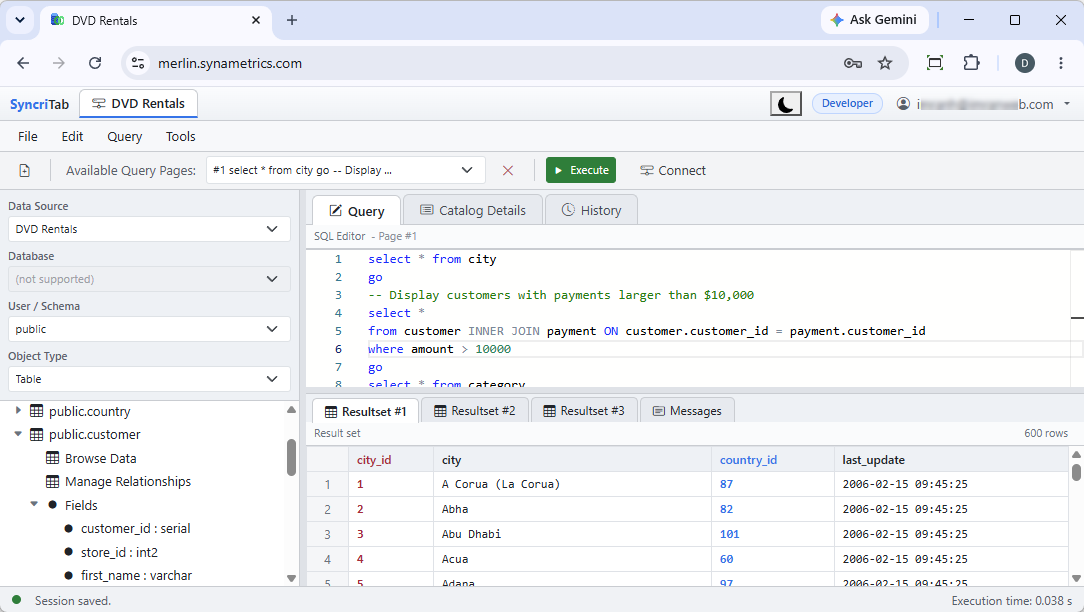
SyncriTab comes from Synametrics Technologies, the makers of WinSQL. If you have used WinSQL, the SyncriTab workspace will feel familiar: the catalog on the left, the SQL editor and results on the right, and similar menus and tools. SyncriTab also uses the same database plugins as WinSQL, so database-specific features behave the same way.
The main difference is where the software runs. WinSQL is installed on each Windows desktop, and each user manages their own connections. SyncriTab runs on one server and is used from a browser on any operating system. Connections, users, and permissions are managed centrally, and scheduled tasks keep running after you close your browser.
About this guide
The guide is organized by role, so you can skip sections that don't apply to you:
- Getting Started: everyone. Installing, first-time setup, and signing in.
- Administration: administrators.
- Data Source Management: managers.
- Working with Databases: developers.
- Account & Support: everyone.
This guide uses these conventions:
- Names of buttons, fields, and other screen elements appear in bold.
- Menu commands are written as File › New Connection, meaning open the File menu and choose New Connection.
- Text you type, file names, and SQL appear in
monospace.
Next steps
- Setting up SyncriTab for the first time? Check the System Requirements, then follow Installing SyncriTab and Initial Setup.
- Has an administrator already created your account? Go to Signing In. Developers can then continue with The Query Workspace.