Synametrics Technologies
Revolving around the core of technology
Document information
| Document ID: | 1810 |
|---|---|
| Subject: | How to upgrade Syncrify server and client to the latest version |
| Creation date: | 7/11/11 3:49 PM |
| Last modified on: | 11/12/18 12:57 PM |
Upgrading Syncrify to a new version
We recommend you always use the latest version of the Syncrify server as well as client. The following steps demonstrate how to check if an upgrade is available and apply it.IMPORTANT
Do NOT uninstall and reinstall Syncrify Server. Installing the Syncrify server again will overwrite your existing configuration, including users.Upgrading Syncrify Server
Steps to upgrade server
- Syncrify will send an alert to the administrator when a new upgrade is available.
- Connect to Syncrify server's web interface as admin
- Click Check for upgrades link appearing under Quick Links on the right hand side. See image below.
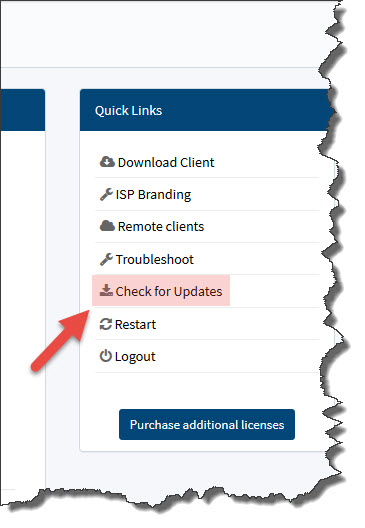
- Follow the instructions on the screen to download and install the new upgrade.
Upgrading Syncrify Client
IMPORTANT:
If you have created a branded client ensure branding is configured to recreate the installer when Syncrify server is upgraded.Steps to upgrade client
Syncrify Client is designed to upgrade itself automatically when the server is upgraded. No user action is required. Click here for a few troubleshooting tips if your client does not upgrade itself.
Add a comment to this document
Do you have a helpful tip related to this document that you'd like to share with other users?
Important: This area is reserved for useful tips. Therefore, do not post any questions here. Instead, use our public forums to post questions.
