Synametrics Technologies
Revolving around the core of technology
What is a Profile
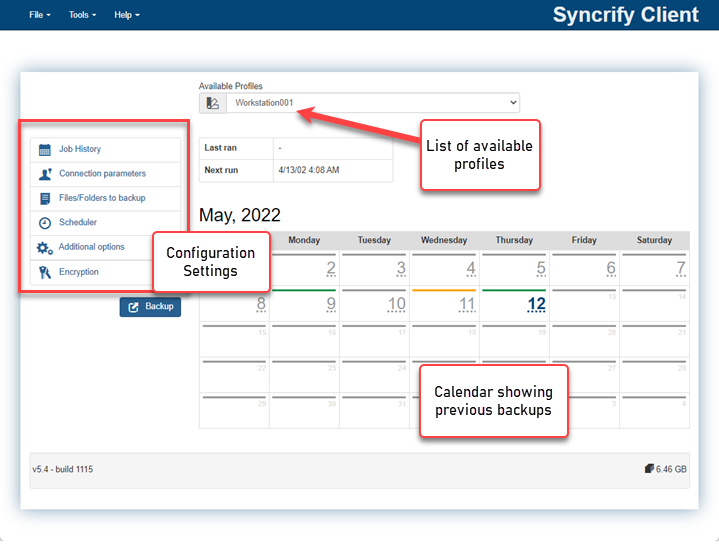 A profile is a logical grouping of files that a user wants to backup. Every profile can contain unlimited number of files. When you first use Syncrify client, it automatically creates a profile with the same name as machine's host name.
The image on the right displays a screen shot of Syncrify client. It shows the following:
- Syncrify client is connecting to a server by the name dellu on port 5800
- User has created a profile called DataBackup and it will backup files in the following folders:
- C:\Temp
- C:\data\temp
- C:\ThurnderbirdProfile\Profiles
- C:\tutorial
- To exclude any file from getting backed up, navigate to it and un-check the box next to it.
Multiple profiles
Typically, you would only create one profile per machine. However, consider the following scenarios when you would want to create additional profiles on a machine.- You want certain files to backup on a different schedule than others
- You are using more than one Syncrify server
- You are backing up a server machine containing files belonging to different users. You create multiple profiles each using a different user account to backup files. This allow the actual users to use the web interface to download their files without seeing someone else data.
Default profile
When you first install Syncrify client on a machine, it creates a profile using the machine's host name. This is called the default profile. Following rules apply for the default profile:- It gets created automatically, provided no other profile exist on the machine
- The name of the default profile matches machine's host name
- Syncrify client won't let the user delete the default profile. This is done to prevent users from mistakenly removing the default profile, which is created again automatically by Syncrify. If you are an expert user and have other profiles on the machine, use the following method to remove the default profile:
- Start Syncrify Client
- Click Open Data Folder under the File menu
- Look for Hostname.syncrify file and delete it.
- This method only works if you have other profiles on the machine. If no other profile is found, Syncrify will recreate the default profile.
