Synametrics Technologies
Revolving around the core of technology
Document information
| Document ID: | 1611 |
|---|---|
| Subject: | Changing the subject line for public links in SynaMan |
| Creation date: | 1/17/11 9:34 AM |
| Last modified on: | 11/6/18 3:25 PM |
Changing subject line for public links
Follow the steps below to change the subject line for the email that is generated for public links.- Locate the installation folder for SynaMan. On Windows, the default location is C:\SynaMan and on Linux it is /opt/SynaMan
- Using any text editor, open AppConfig.xml file for modification. We recommend creating a backup file in case you need to rollback
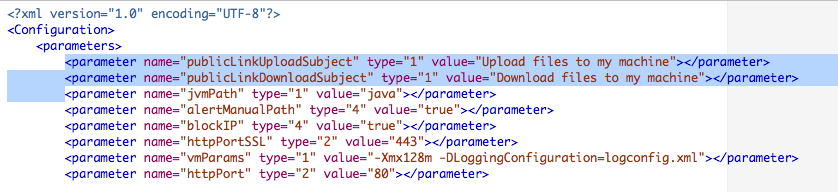
- Add two lines, similar to the lines below.
<parameter name="publicLinkUploadSubject" type="1" value="Upload files to my machine"></parameter>
<parameter name="publicLinkDownloadSubject" type="1" value="Download files to my machine"></parameter>
Put your customized subject within the value tag.
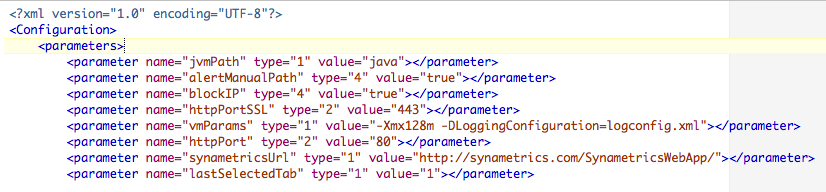
The following image display the file before modification.
The following image display the file after the change.
Related links
Changing email template for public linksAdd a comment to this document
Do you have a helpful tip related to this document that you'd like to share with other users?
Important: This area is reserved for useful tips. Therefore, do not post any questions here. Instead, use our public forums to post questions.
