Synametrics Technologies
Revolving around the core of technology
Document information
| Document ID: | 1173 |
|---|---|
| Subject: | No shared folder found |
| Creation date: | 12/22/09 11:17 AM |
| Last modified on: | 12/22/09 11:42 AM |
Unable to associate shared folders
Symptoms
When you try to add folders to a user, you get the following message.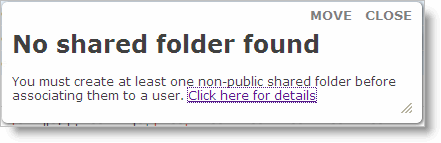
Resolution
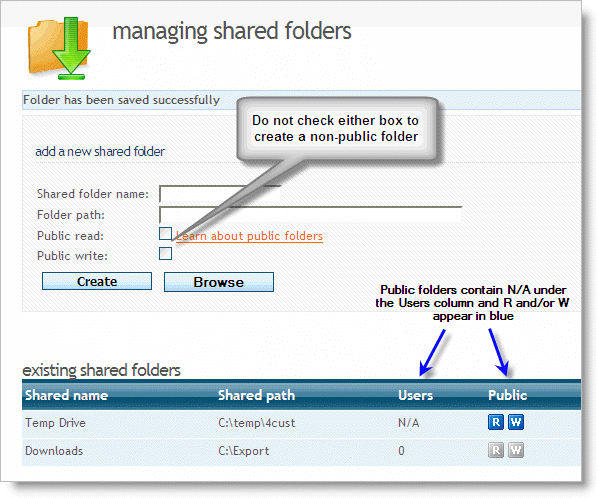
You must create at least one non-public folder before associating them to a user. A non-public folder is a folder where Public Read and Public Write are not checked.IMPORTANT You cannot explicitly associate a public folder to a user. They are added to every user automatically at run time. Therefore, if every folder in your system is created as public, you won't be able to associate them to any user.
Distinguishing the two types
SynaMan displays public as well as non-public folders on the same screen. Since you cannot explicitly associate a user with a public folder, the system displays an N/A under the Users column. Additionally, the image for R and/or W appears in blue for public folders and is grayed out for non-public folders.
Add a comment to this document
Do you have a helpful tip related to this document that you'd like to share with other users?
Important: This area is reserved for useful tips. Therefore, do not post any questions here. Instead, use our public forums to post questions.
