Synametrics Technologies
Revolving around the core of technology
Document information
| Document ID: | 804 |
|---|---|
| Subject: | Application hangs when I press the Cancel button in WinSQL |
| Creation date: | 7/29/09 4:21 PM |
| Last modified on: | 12/11/18 3:17 PM |
Details
WinSQL starts a new thread when a user runs a query. While it waits for the server to respond the user can click the stop button to abort, which get called from the primary thread. More specifically, WinSQL calls the SQLCancel method in the ODBC API. Some ODBC drivers block the execution when this method is called even from a different thread - they wait for the server to reply, which can take long. When this happens it appears that the application is hung since the primary thread is waiting for the server's reply.
This only occurs with certain ODBC drivers. For instance, the driver for Microsoft SQL Server does not block and therefore, the stop button returns right away.
Unfortunately, this problem in the ODBC driver makes the user believe that WinSQL is not responding. Whereas the limitation is either imposed by the driver or the database.
Note that some databases do not support aborting a running query at all. In that case the only choice you have is to terminate the connection from your database end. Terminating a connection should cause SQLCancel method to return right away, giving control back to WinSQL.
Workaround
As a work around, you can configure WinSQL to reconnect to the database. To enable this click Edit/Configuration on the main menu and check Reconnect on query cancel. Refer to the image below.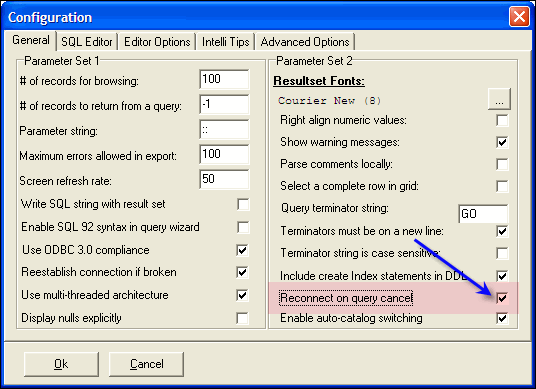
Add a comment to this document
Do you have a helpful tip related to this document that you'd like to share with other users?
