Synametrics Technologies
Revolving around the core of technology
Document information
| Document ID: | 848 |
|---|---|
| Subject: | Finding version and release date of an ODBC driver |
| Creation date: | 8/7/09 10:25 AM |
| Last modified on: | 12/12/18 10:11 AM |
Details
It is very helpful to know the version and release date of an ODBC driver. We always recommend you use the latest version of the ODBC driver with WinSQL.IMPORTANT: WinSQL shares the memory space with the ODBC drivers. If any ODBC driver throws an exception or runs into a problem, they appear through WinSQL and users get the perception that WinSQL generated the error.
Follow the steps below to check the version and release date of any ODBC driver.
- Open Windows Control Panel
- Double click Administrative Tasks
- Open Data Source (ODBC)
- Select the Drivers tab
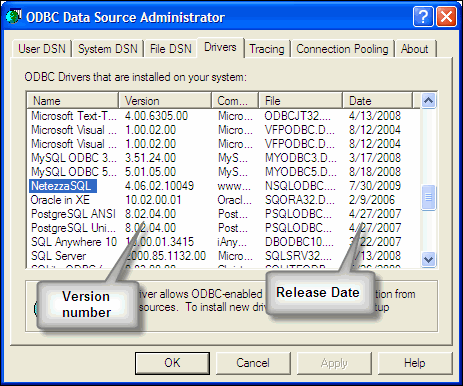
- This tab lists all drivers with their version and release dates. Refer to the image below.
Add a comment to this document
Do you have a helpful tip related to this document that you'd like to share with other users?
Important: This area is reserved for useful tips. Therefore, do not post any questions here. Instead, use our public forums to post questions.
