Synametrics Technologies
Revolving around the core of technology
Document information
| Document ID: | 818 |
|---|---|
| Subject: | Changing the title of a tab in the resultset? |
| Creation date: | 7/29/09 4:51 PM |
| Last modified on: | 7/29/09 4:51 PM |
Details
The title of a tab can be changed in two ways:
- Clicking the right mouse button in the result grid and selecting Modify tab's caption from the pop-up menu
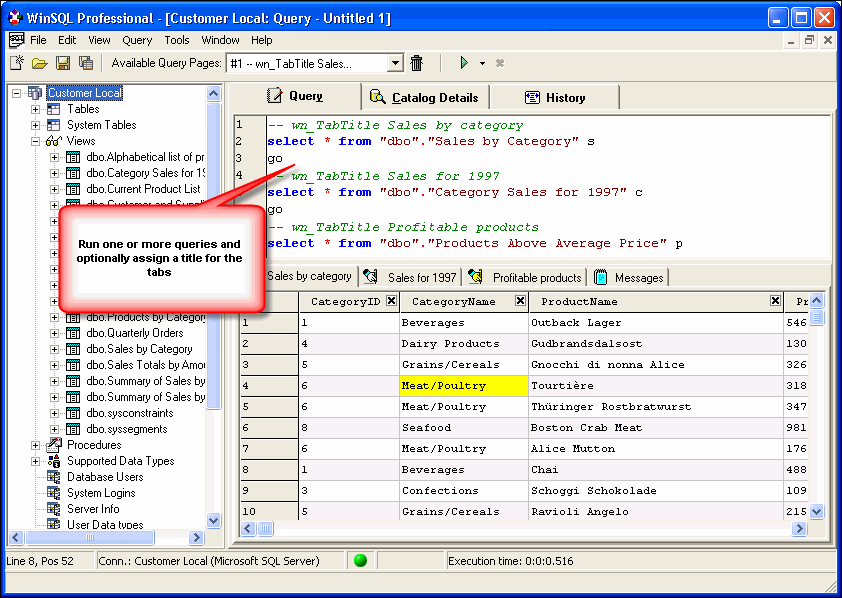
- Use a specify comment right before your query. For example:
-- wn_TabTitle Sales by category
select * from "dbo"."Sales by Category" s
Refer to the image below
User comments
Posted by George Soulis on 5/12/16 7:39 AM
It would be nice if the same syntax could have the same title printed before the result set when the script is run in text mode.
Add a comment to this document
Do you have a helpful tip related to this document that you'd like to share with other users?
Important: This area is reserved for useful tips. Therefore, do not post any questions here. Instead, use our public forums to post questions.
